Abstract
AI coding agents-tools like Cursor, Claude Code, and others-have become integral to modern software development workflows. Starting from the last quarter of 2025, these tools have reached a threshold: they're now good enough to be genuinely useful and reliable to some extent. Adoption is accelerating. Yet critical discourse on their limitations and safe usage patterns remains sparse.
This post examines the role of AI coding agents in building complex systems, drawing from over a year of hands-on experience across diverse projects: 2 trading ML pipelines, an end-to-end robotic software system (ROS2, Gazebo, MoveIt, YOLO-based vision), a custom construction-tech solution, and a complete, sophisticated native mobile app with more than 10 business services, deployed to both platforms.
While these tools offer significant advantages in development speed, cross-domain knowledge, and research augmentation, they introduce critical risks that are often underestimated: inconsistent reasoning that sounds plausible but fails when challenged, silent errors masked by default values, and implicit design decisions buried in generated code.
Key Takeaways:
- AI coding agents produce outputs that "sound right" but require active verification-especially dangerous in domains where you lack the expertise to challenge them
- System architecture, core algorithms, and design boundaries should remain human-driven; delegate implementation, not design
- Verification loops, clarification protocols, and frequent documentation are not optional-they are essential safeguards
- The human cognitive filter becomes more critical with AI assistance, not less
The post follows a Good → Dangerous → Essential structure, and concludes with a bonus section demonstrating a multi-agent workflow for ML feature engineering-where a codebase-aware agent generates research prompts for parallel deep-research agents, with results curated into actionable features.
This post is intended for ML practitioners, software engineers using AI coding tools, and anyone building non-trivial, out-of-distribution systems with agent assistance-projects that don't follow standard patterns the model has seen thousands of times, where bugs don't just break UIs but corrupt data pipelines, produce silent financial losses, or cascade through tightly coupled components.
Introduction
There's a moment every developer using AI coding agents knows: you describe what you want, the agent generates 200 lines of code, and it just works. Tests pass. Edge cases handled. You feel like you've unlocked something.
Then there's the other moment. The one where you spend four hours tracking down a bug, only to discover the AI made a "reasonable" assumption that was subtly, silently wrong-and you merged it because it looked right.
Both moments are real. Both happen regularly. The gap between them is what this post is about.
The current discourse around AI coding agents tends toward extremes. On one side: breathless claims of 10x productivity, demos of full apps built in minutes. On the other: dismissals that it's "just fancy autocomplete" or warnings so vague they're not actionable. What's missing is the middle ground-detailed, example-driven analysis of how these tools behave in production systems, where the stakes are higher than a demo.
My context: Over the past year, I've used AI coding agents extensively-Cursor, Claude Code (Opus), and briefly Antigravity-across several non-trivial projects: 2 trading ML pipelines, an end-to-end robotic software system, a construction-tech platform, and a mobile app. The primary lens for this post is the trading ML system: a model that predicts P(price moves favorably before adversely | features at entry). With a 1:1 risk-reward ratio, take-profit and stop-loss are equidistant from entry. Random price movement would yield ~50% win rate. The model's job is to find patterns that improve on that baseline.
This domain is unforgiving. A subtle bug doesn't just break a UI-it corrupts training data, introduces lookahead bias, or silently degrades model performance in ways you won't notice until real money is on the line. It's exactly the kind of environment where AI coding agents reveal both their strengths and their failure modes.
The thesis is simple: AI coding agents are genuinely powerful, and they are genuinely dangerous. The difference between leverage and liability is how you use them-specifically, whether you maintain active cognitive engagement or slip into passive acceptance of plausible-sounding outputs.
The sections that follow break this down into what works, what fails, and what you must do to stay on the right side of that line.
Tools & Experience
I started using AI coding agents in summer 2024, beginning with Cursor. At the time, the models were barely usable. Getting a useful code snippet required extensive back-and-forth-clarifying, correcting, re-prompting. There was no such thing as "agentic" behavior: no autonomous multi-step implementations, no reliable reasoning chains. You prompted, you got output, you fixed it manually. Repeat.
Over the following months, things improved noticeably. Reasoning became sharper. Context handling got better. The tools started feeling less like autocomplete and more like junior collaborators that occasionally needed supervision.
Claude Code entered my workflow about five or six months ago and quickly became my primary tool. I've tested GPT variants beyond 5.0 and Gemini 3 Pro as well, but from my experience, Claude Code with Opus 4.5 was meaningfully ahead across multiple dimensions: instruction following, code coherence, contextual awareness, and the ability to reason through ambiguous requirements. I stopped experimenting and committed to it as my daily driver for coding and system development.
More recently, I've started using Antigravity to run multiple agents in parallel-Cursor with GPT 5.2 Codex, Claude Code with Opus 4.5, and Gemini 3 Pro-on the same problem. This isn't about finding "the best" answer; it's about triangulating. When debugging subtle issues or making design decisions, seeing how three different models approach the same problem provides a more holistic view. Where they agree, confidence increases. Where they diverge, it flags areas that need closer human attention.
The Good: Value Proposition When Used Correctly
When AI coding agents work, they work remarkably well. The key is understanding where they excel.
Speed on in-distribution tasks. If your project follows patterns the model has seen thousands of times-simple-to-medium complexity websites, mobile apps with widely adopted frameworks like React Native or Flutter, standard CRUD backends-these tools are a killer. What used to take days of boilerplate setup now takes hours. The kick-off velocity is genuinely transformative for established patterns.
Breadth of knowledge. No single developer has deep expertise across every framework, library, and language. AI agents do. Need to integrate a payment gateway you've never used? Set up RevenueCat for in-app purchases in a framework you just started learning? Parse a file format you've never seen? The agent can pull from a vast corpus of documentation and examples, often faster than you could find and read the relevant Stack Overflow threads.
Research assistants with rich context. One underrated use case: dumping all relevant documentation, specs, or reference material into your repo and letting the agent blend that information into your system. It becomes a context-aware research assistant that doesn't just retrieve information but integrates it-mapping external API specs to your internal data models, translating documentation into implementation. The same applies to academic papers: feed it a paper describing an algorithm or technique, and it can help translate the methodology into working code within your existing architecture.
Tests and documentation. Writing unit tests and documentation is often the first thing to slip when deadlines tighten. AI agents handle these tasks well. Describe what a function should do, and it generates reasonable test cases. Ask it to document a module, and it produces coherent explanations. These aren't glamorous tasks, but offloading them preserves your cognitive budget for harder problems.
DevOps and configuration guidance. The messy stuff-Linux commands, server setup, build configurations, environment variables, Docker orchestration-is surprisingly well-handled. These tasks often require stitching together knowledge from scattered documentation and half-outdated blog posts. The agent consolidates this, guiding you through setup sequences that would otherwise cost hours of trial and error.
The pattern is clear: for tasks that are well-defined, well-documented, and well-represented in training data, AI coding agents deliver real value. The danger emerges when you assume this extends to everything.
The Dangerous: Critical Pitfalls
The previous section described where AI coding agents excel. This section describes where they fail-and more importantly, how those failures manifest in ways that are easy to miss.
These aren't edge cases. They're patterns I've encountered repeatedly across different projects, different models, and different contexts. Understanding them is the difference between leveraging a powerful tool and introducing subtle, compounding bugs into your system.
5.1 Reliability & Consistency Issues
The subtlest problem with AI coding agents isn't that they produce wrong answers. It's that they produce wrong answers that sound right.
The outputs are coherent, well-structured, and delivered with confidence. They use correct terminology. They reference real concepts. And unless you're actively thinking-unless you challenge the reasoning rather than just accepting it-you'll merge code based on flawed logic without noticing.
Case study: Rolling window feature calculation.
I was reviewing a feature engineering function where the AI had excluded the current candle's close price from a rolling window calculation. When I asked why, the response was immediate and confident: "This is intentional to prevent lookahead bias."
Sounds reasonable. Lookahead bias is a real concern in time-series ML. But it's wrong. In a live trading context, we do have access to the current close-that's the price we're observing when we make a decision. Excluding it isn't preventing bias; it's discarding information.
When I challenged this, the AI acknowledged the error but pivoted: "It's just a design choice and doesn't significantly impact the model." Also wrong. Whether you include the signal bar in your lookback window meaningfully affects what the feature represents.
I pushed further, explaining the actual intent: comparing the signal bar against historical context, where including it would dilute the comparison. The AI agreed: "You're right, that's the correct reasoning."
Then I ran an experiment. I cleared the context-rewound to a point where the conversation still had sufficient information but the recent back-and-forth was gone-and asked the same questions again, the same way.
This time, the AI found the decision "weak and inconsistent" and couldn't provide clear justification. When I challenged it again, it eventually arrived at the correct conclusion. But it took the same amount of pushing.
This is a critical reliability issue. The same question, with the same available context, produced different reasoning paths depending on where in the conversation it appeared. The AI wasn't reasoning from first principles; it was pattern-matching against conversational momentum.
The implication is uncomfortable: if you don't already know enough to catch these errors, you won't catch them. In domains where you lack expertise, plausible-sounding explanations will sail through your review unchallenged.
5.2 Flawed Logic Without Defensive Checks
Beyond reasoning inconsistencies, there's a more mechanical failure mode: code that's structurally flawed but passes casual inspection.
Consider this feature calculation function the AI generated:
@register("rsi_momentum")
def rsi_distance_to_threshold(
    row: pd.Series,
    lookback: pd.DataFrame,
    rsi_threshold: float = 30.0,
) -> float:
    """
    How far RSI is from the trigger threshold, normalized.

    For OVERSOLD signals: (threshold - rsi_min) / threshold
        - Higher value = more oversold (further below threshold)
    For OVERBOUGHT signals: (rsi_max - (100 - threshold)) / threshold
        - Higher value = more overbought (further above threshold)

    Clipped to [0, 2] for stability.
    """
    signal_type = row.get("signal_type", "UNKNOWN")
    rsi_vals = [
        row.get("rsi_5m", 50.0),
        row.get("rsi_15m", 50.0),
        row.get("rsi_1h", 50.0),
    ]

    if signal_type == "OVERSOLD":
        rsi_extreme = min(rsi_vals)
        distance = (rsi_threshold - rsi_extreme) / rsi_threshold
    elif signal_type == "OVERBOUGHT":
        rsi_extreme = max(rsi_vals)
        upper_threshold = 100 - rsi_threshold
        distance = (rsi_extreme - upper_threshold) / rsi_threshold
    else:
        distance = 0.0

    return float(np.clip(distance, 0.0, 2.0))
At a glance, it looks fine. It has a docstring. It handles both signal types. It clips the output for "stability." But walk through the math:
OVERSOLD case (threshold=30): If rsi_extreme is 20, distance = (30 - 20) / 30 = 0.33. If rsi_extreme is 0 (the minimum possible RSI), distance = (30 - 0) / 30 = 1.0. The maximum possible value is 1.0.
OVERBOUGHT case (threshold=30, so upper_threshold=70): If rsi_extreme is 80, distance = (80 - 70) / 30 = 0.33. If rsi_extreme is 100 (the maximum possible RSI), distance = (100 - 70) / 30 = 1.0. Again, maximum is 1.0.
The clip to [0, 2] is dead code. With valid RSI values (0-100), the distance naturally falls in [0, 1]. The clip will never trigger. It's defensive code that defends against nothing-while giving the impression that edge cases were considered.
Meanwhile, the actual edge cases go unhandled. What if signal_type is missing? It defaults to "UNKNOWN" and returns 0.0-silently. What if the RSI columns don't exist? They default to 50.0-the neutral value that masks the absence of data entirely.
This is the pattern: superficial robustness (clipping, type hints, docstrings) combined with fundamental gaps in logic and error handling.
5.3 Hardcoded Decisions in Long Tasks
When you give an AI agent a longer implementation task-"build the feature engineering pipeline" rather than "write this one function"-it makes dozens of internal decisions. Window sizes. Threshold values. Normalization approaches. Column names. Aggregation methods.
These decisions get hardcoded directly into the implementation. There's no configuration section. No parameter documentation. No explicit list of "here are the choices I made." The decisions are scattered across functions, buried in default arguments and magic numbers.
This creates three problems:
-
Invisibility. You don't know what decisions were made without reading every line of code. A 500-line module might contain 30 implicit choices, none of them surfaced.
-
Inflexibility. Want to experiment with a different EMA period? You're grepping through code and hoping you find all the places it matters.
-
Review failure. Code review catches syntax and obvious bugs. It rarely catches "this hardcoded value should probably be configurable" because the reviewer doesn't know it was a decision point.
The fix is straightforward: require explicit configuration blocks at the top of each module.
from .registry import register

# ===========================================================================
# CONFIGURABLE PARAMETERS
# ===========================================================================
EMA_SHORT_SPAN = 20          # Short EMA period
EMA_LONG_SPAN = 50           # Long EMA period
EMA_SLOPE_SHORT_LOOKBACK = 5 # Bars for EMA20 slope calculation
EMA_SLOPE_LONG_LOOKBACK = 10 # Bars for EMA50 slope calculation
PRICE_MOMENTUM_LOOKBACK = 10 # Bars for price momentum
Now decisions are visible. They're adjustable. They're reviewable. When you come back to this code in three months, you can see at a glance what the tunable parameters are without reverse-engineering the implementation.
This isn't something AI agents do naturally. You have to explicitly instruct them: "Surface all parameter choices as named constants at the top of the module." Without that instruction, you get implicit decisions buried in code-and you won't know what you don't know.
5.4 Silent Errors
This is perhaps the most dangerous pattern: AI-generated code that returns default values where it should raise exceptions.
Look again at the RSI function:
signal_type = row.get("signal_type", "UNKNOWN")
rsi_vals = [
    row.get("rsi_5m", 50.0),
    row.get("rsi_15m", 50.0),
    row.get("rsi_1h", 50.0),
]
If signal_type is missing, it becomes "UNKNOWN", which falls through to distance = 0.0. The function returns successfully. No error. No warning. Downstream code has no idea the input was malformed.
If the RSI columns are missing, they default to 50.0-the neutral midpoint that communicates "nothing interesting here." The feature gets computed. It's just wrong.
This pattern appears constantly in AI-generated code. The instinct seems to be: "handle the edge case gracefully." But "gracefully" often means "silently return something that won't crash," which is exactly the wrong behavior for data pipelines.
In an ML system, silent errors compound. Bad features flow into training. Models learn from corrupted data. Performance degrades in ways that are nearly impossible to trace back to the source. By the time you notice something is wrong, the bug has been baked into months of historical data.
The correct behavior is almost always: fail loudly.
signal_type = row.get("signal_type")
if signal_type is None:
    raise ValueError(f"Missing signal_type in row: {row.name}")

required_cols = ["rsi_5m", "rsi_15m", "rsi_1h"]
missing = [c for c in required_cols if c not in row or pd.isna(row[c])]
if missing:
    raise ValueError(f"Missing RSI columns {missing} in row: {row.name}")
This isn't about being pedantic. It's about ensuring that when something goes wrong, you find out immediately-not six months later when you're debugging why your model's performance degraded.
5.5 Outsourcing Design
There's a temptation, especially when AI agents are producing working code quickly, to hand over larger chunks of responsibility. Not just "implement this function" but "design the feature engineering pipeline" or "architect this module."
For in-distribution tasks-standard web apps, common mobile patterns, well-documented integrations-this often works. The AI has seen thousands of similar systems. It knows the patterns.
For out-of-distribution work-novel ML pipelines, domain-specific systems, anything that doesn't follow templates the model has seen repeatedly-this is a mistake.
The AI will produce something. It will look reasonable. It will have sensible-sounding structure. But the design decisions will be generic, driven by pattern-matching to superficially similar problems rather than deep understanding of your specific constraints and requirements.
The result is a system that works until it doesn't-until you hit a case the generic design didn't anticipate, and you discover the architecture doesn't accommodate it.
The better approach:
-
Design the system yourself. Define the boundaries. Specify the interfaces. Make the architectural decisions based on your understanding of the problem.
-
Create context. Write down your decisions and rationale. The more explicit context you provide, the better the AI can operate within your constraints rather than inventing its own.
-
Use the AI for refinement. Have it generate clarifying questions. "What happens if X?" "How should Y be handled?" This surfaces edge cases you might have missed while keeping you in the driver's seat.
-
Delegate implementation, not design. Once the architecture is defined, implementation is where AI agents shine. They can fill in functions, write tests, handle boilerplate-all within the structure you've established.
The line is: humans define what and why; AI helps with how. When you invert this-when you let the AI define the what and why-you're outsourcing the thinking that matters most.
The Essential Practices: Best Practices & Mitigations
The pitfalls described above aren't arguments against using AI coding agents. They're arguments for using them correctly-with practices that catch failures before they compound.
What follows are the patterns that have made the difference between productive collaboration and debugging nightmares. None of them are optional if you're working on systems where correctness matters.
6.1 Verification Loops
The single most important practice is establishing verification loops: structured ways to confirm that what was generated actually does what you intended.
The form of the loop depends on the task:
For feature engineering: Compute a feature on sample data. Print intermediate values. Manually verify the math on a few rows. Check that edge cases produce expected outputs-or expected errors.
# Before trusting any new feature function:
sample_row = df.iloc[100]
result = my_new_feature(sample_row, lookback_df)
print(f"Input: {sample_row[['close', 'rsi_5m', 'signal_type']].to_dict()}")
print(f"Output: {result}")
# Now manually verify: does this output make sense given these inputs?
For data pipelines: Validate row counts at each stage. Check for unexpected nulls. Compare distributions before and after transformations. If 1000 rows go in, you should know exactly how many come out and why.
For API integrations: Log request/response pairs. Verify that the parsed response matches what the raw response contains. Don't trust that the AI correctly understood the API's structure.
For model training: Track metrics at every stage. If accuracy suddenly jumps or drops, that's a signal to investigate-not celebrate or despair.
The pattern is always the same: don't trust the output; verify it. The verification doesn't need to be exhaustive. It needs to be systematic enough that obvious failures get caught before they propagate.
6.2 Clarification Questions
One of the most effective ways to improve AI output quality is to front-load clarification-before the agent writes any code.
The technique is simple: after describing the task, explicitly instruct the AI to ask clarifying questions before proceeding.
"Before implementing this, ask me any questions you need answered to ensure you understand the requirements correctly. Don't make assumptions-surface them as questions."
This accomplishes two things:
It surfaces hidden assumptions. The AI will ask about edge cases, data formats, error handling preferences, and boundary conditions that you might not have specified. These are questions you'd have to answer eventually-better to answer them before the code is written than after.
It forces you to think. Answering the questions requires you to engage with the problem. Often, you'll realize your own specification was incomplete or ambiguous. The clarification process improves your understanding, not just the AI's.
After the questions are answered, ask the AI to summarize its understanding before proceeding:
"Now summarize your understanding of the task and the key decisions we've made. Then implement."
This creates a checkpoint. If the summary is wrong, you catch it before implementation. If it's right, you have documentation of what was agreed.
6.3 Debugger Sessions
Reading AI-generated code is not enough. You need to run it-step by step, watching values change, verifying that each line does what you expect.
This isn't about finding bugs after they cause problems. It's about building understanding. When you step through code in a debugger, you see:
- What values actually flow through the system (not what you assumed would)
- Where decisions are made and what conditions trigger them
- Edge cases that the code handles-or doesn't
- Implicit assumptions baked into the logic
For any non-trivial AI-generated module, a full debugger walkthrough should be standard practice. Set breakpoints at function entry points. Step through representative inputs. Watch the variables.
This takes time. It's still faster than debugging a production failure three months later when you've forgotten how the code works and the original context is gone.
The debugger session also serves as a forcing function for comprehension. If you can't explain what each line does while watching it execute, you don't understand the code well enough to trust it.
6.4 Frequent Commits & Living Documentation
AI coding agents can generate substantial amounts of code quickly. This creates a new failure mode: losing track of what changed, when, and why.
The mitigation is aggressive version control hygiene:
Commit frequently. After each coherent unit of work-a new function, a bug fix, a refactor-commit it. Small commits are easier to review, easier to revert, and easier to understand when you're reading history later.
Write meaningful commit messages. "Fix bug" tells you nothing. "Fix off-by-one in rolling window calculation that excluded current bar" tells you everything. When you're bisecting a regression six weeks from now, good commit messages are the difference between minutes and hours.
Maintain a living checkpoint document. A CHECKPOINT.md or similar file that captures the current state of the project: what's done, what's pending, what decisions were made and why. Update it as you work.
This serves multiple purposes:
-
Context recovery. When you return to a project after a break, the checkpoint tells you where you left off.
-
AI context. When you start a new session with an AI agent, pointing it at the checkpoint gives it immediate understanding of the project state-without you having to re-explain everything.
-
Decision log. When you wonder "why did we do it this way?", the checkpoint has the answer. This is especially valuable for AI-assisted projects where decisions can get made quickly and forgotten just as fast.
The discipline of maintaining documentation forces you to articulate what you're doing. That articulation often catches fuzzy thinking before it becomes fuzzy code.
6.5 Rule Sets for Recurrent Issues
The pitfalls in this post aren't one-off occurrences. They're patterns. The same failure modes appear across projects, across models, across time.
This means they can be codified. Every time you encounter a recurring issue, document it as a rule. Here's an example of what such a rule set might look like:
## AI Coding Rules (Example)

### Error Handling
- Never use default values for missing required data
- Always raise exceptions for malformed inputs
- Log warnings only for genuinely optional fields

### Configuration
- Surface all magic numbers as named constants at module top
- Group related parameters in config blocks
- Document the meaning and valid range of each parameter

### Verification
- Add print statements for intermediate values during development
- Verify feature calculations manually on sample rows before trusting
- Check row counts before and after every pipeline stage

### Tooling
- Use the agent's native search/file tools instead of bash commands-more reliable, avoids path errors
- Always run formatters (black, prettier, etc.) and linters after code generation
- Use uv for Python dependency management
Your own rule set will look different-shaped by your stack, your domain, and the specific failure modes you encounter. The point isn't to copy this list; it's to build your own.
These rules become part of your prompt context. When you start a new task, you include them:
"Follow these coding standards: [rules]. Now implement..."
Over time, your rule set becomes a distillation of every lesson learned. It's institutional knowledge about how to work with AI agents effectively-knowledge that would otherwise exist only in your head and get forgotten.
The rules also serve as a checklist during code review. When reviewing AI-generated code, you can systematically check: does this violate any of my established rules?
This won't catch everything. But it catches the things you've seen before-and those are the most likely to recur.
The Human Filter
There's a common assumption about AI coding agents: they reduce cognitive load. Less mental effort, more output.
This assumption is wrong.
The paradox of AI-assisted development is that it demands more cognitive engagement, not less. Output velocity increases, but the burden of verification doesn't disappear-it concentrates.
When you write code yourself, verification is distributed. You think through logic as you type. You catch errors as you make them. Writing is understanding.
When an AI writes code, verification collapses into a single moment: review. You're presented with a finished artifact and asked to judge its correctness. The thinking that would have happened incrementally now has to happen all at once, against code you didn't write, output that's fluent and confident and designed to look correct.
This is harder, not easier.
The biology of filtering.
The brain regions handling this work-the dorsolateral prefrontal cortex (reasoning, working memory) and anterior cingulate cortex (conflict detection)-are metabolically expensive. They fatigue. After hours of demanding review, your ability to catch errors degrades. This isn't weakness; it's biology.
Your filtering capacity is finite. Burn it on low-value review, and you'll have less when it matters-exactly where AI failures hide.
Attention is the bottleneck.
The AI generates faster than you can review. The bottleneck has shifted from production to verification. The goal isn't maximizing output; it's maximizing verified output.
This means being deliberate: high scrutiny for high stakes (core algorithms, data transformations), lower scrutiny for code that fails visibly if wrong, systematic verification over exhaustive review.
The uncomfortable conclusion.
AI coding agents don't reduce the need for expertise. They change its application.
You still need domain knowledge to catch errors. You still need to verify implementations match intentions. The AI does everything except this.
Expertise becomes more valuable, not less. The ability to look at generated code and know whether it's correct-this is the differentiator. Without it, you're reviewing code you can't evaluate, building systems you don't fully understand.
The human filter isn't a limitation to be automated away. It's what makes AI assistance valuable rather than dangerous.
Bonus: Multi-Agent Feature Engineering
The sections above focus on mitigating risks. This one demonstrates what becomes possible when you apply those practices-and push further.
I needed new features for an ML pipeline. The kind of research this requires-reviewing academic papers, scanning open-source implementations, reading practitioner blogs-would take days of manual work. Here's how I compressed that into hours.
The setup:
Claude Code had spent weeks with my codebase. I used it to generate a structured research prompt-not a casual question, but a 234-line brief encoding system context, existing features, data constraints, and specific research questions.
This prompt went to three deep research tools in parallel: GPT, Claude, and Gemini (using their respective chat interfaces with deep research enabled). Each conducted independent literature search-reviewing tens of open-source repos, papers, and blogs-and returned results in separate files.
Why parallel matters: Different models have different training biases. Claude leaned academic and statistical. GPT focused on practitioner patterns. Gemini surfaced microstructure concepts. Using all three provided coverage none achieved alone. Where they agreed, confidence increased. Where they diverged, it flagged areas for closer attention.
Human curation:
Raw output totaled 2000+ lines. The curation criteria: Is it implementable with my data? Is it theoretically sound? Does it add unique signal? Will it remain stationary?
25 features survived curation.
Consolidation → Framework → Implementation:
I consolidated selected features into a research document with exact formulas, parameter recommendations, and interpretation notes. Before implementation, I created an IMPLEMENTATION_GUIDE.md codifying the rules from earlier sections-no magic numbers, no silent defaults, proper validation.
Claude Code then implemented features one by one, with the guide in context: check research doc → implement → test → verify. The rules weren't just suggestions; they were enforced by the context the agent was working within.
Results:
Combined with my existing 34 features, I ran multiple ML pipelines and reviewed feature importances. The newly discovered features were consistently among the top performers-not marginally better, but meaningfully superior. The multi-agent research process had surfaced signal I wouldn't have found alone.
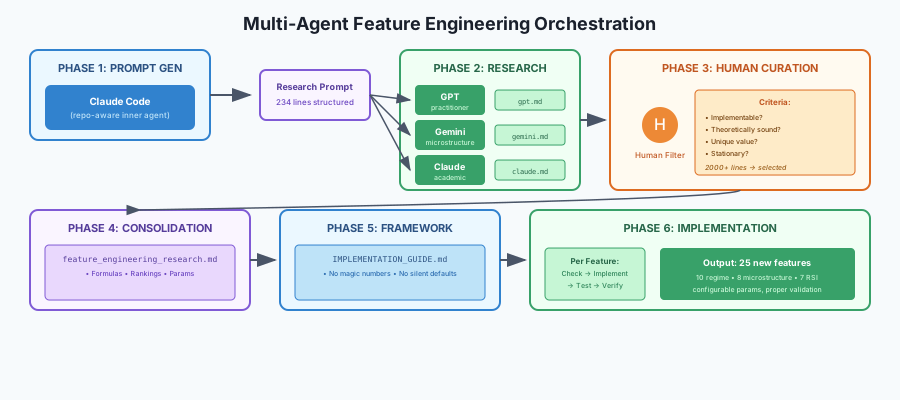
What made this work: Context-aware prompting (the inner agent's accumulated understanding produced a research brief no fresh prompt could match), triangulation (three models with different biases expanded the search space), and structured handoffs (each phase produced artifacts-nothing implicit). The multi-agent workflow isn't about replacing human judgment. It's about expanding the search space while keeping the human filter firmly in place.
Conclusion
AI coding agents are not magic, and they are not toys. They are power tools-capable of significant output, capable of significant damage, and utterly indifferent to which one they produce.
The thesis of this post reduces to three points:
1. The value is real, but bounded. For in-distribution tasks-standard patterns, documented frameworks, established patterns-these tools deliver genuine leverage. For out-of-distribution work, the leverage diminishes and the risks compound. Know where you are on that spectrum.
2. The failures are predictable. Plausible but wrong reasoning. Silent errors masked by defaults. Implicit decisions buried in generated code. Design choices that look sensible but don't fit your constraints. These aren't edge cases. They're the default behavior. Expect them.
3. The countermeasures are non-negotiable. Verification loops. Clarification protocols. Debugger sessions. Frequent commits. Living documentation. Codified rules. These aren't best practices for the diligent-they're the minimum requirements for anyone building systems where correctness matters.
The uncomfortable truth is that AI coding agents raise the bar for effective use, not lower it. They demand more expertise to review outputs you didn't write, more discipline to verify what gets merged, more active thinking precisely when the tool makes passive acceptance easy.
The developers who will benefit most are those who already understand their domains deeply enough to catch errors, already maintain rigorous development practices, and already think critically about generated outputs. The tools amplify what you bring to them.
Use them. They're too useful not to. But use them with your eyes open, your verification loops tight, and your filter engaged.
The double-edged sword cuts both ways. Which edge you get depends entirely on how you hold it.
Further Reading
Official Tool Guides:
-
Claude Code: Best practices for agentic coding – Anthropic Engineering Blog (Apr 2025) Official guide covering project configuration (CLAUDE.md), context management, tool allowlists, and planning strategies for Claude Code.
-
Best practices for coding with agents – Cursor Team Blog (Jan 2026) Cursor's official guide on Plan Mode, managing long-chat context, static rules/skills, and debugging AI-generated code.
Research & Data:
-
Measuring the Impact of Early-2025 AI on Experienced Open-Source Developer Productivity – METR (Jul 2025) RCT finding that experienced OSS developers took 19% longer with AI tools than without-counterintuitive data challenging productivity assumptions.
-
AI Code Is a Bug-Filled Mess – Futurism (Dec 2025) Investigative piece citing CodeRabbit, Bain, Apiiro, and METR studies. Key findings: AI code had 1.7x more bugs per PR, 10x more security issues.
-
2025 State of AI Code Quality – Qodo AI (2025) Industry survey of ~600 developers. 65% report AI assistants miss relevant context. Data on adoption, perceived productivity, and the trust gap.
Practitioner Perspectives:
- AI-assisted coding for teams that can't get away with vibes – Nilenso Blog (May 2025) Hard-won lessons from real projects: precise specs, metaprompting, RULES.md patterns, and why "the best engineers get more out of AI."